Google Ranking Drop: How to Recover Lost Rankings
By Devon Marsh · 2025-10-15T00:00:00+00:00 · 14 min read
Table of contents
A Google ranking drop can reduce your visibility, clicks, and organic traffic. It can happen after an algorithm update, technical issue, content change, or ranking shift. The first step is finding the real cause before making changes. Random edits can make the problem harder to diagnose. This guide explains how to check your SEO data, find ranking losses, and recover lost Google rankings with a clear process.
What Causes a Google Ranking Drop?
A Google ranking drop can happen for many reasons. Your page may lose positions because competitors improved their content to align better with top Google ranking factors. Google may also change how it understands a search query, shifting what it prioritizes on the results page. Technical SEO problems can create another source of lost visibility by hindering your site's performance. In some cases, the issue isn't your rankings at all, but rather tracking glitches or temporary SERP volatility.
Can an Algorithm Update Cause Lost Rankings?
Yes, an algorithm update can change how Google evaluates pages. Your rankings may move when Google's systems change. This doesn't always mean your website has a penalty. It may mean other pages now better match the search results.
Check your ranking data before making major changes. Look for drops that started around the same time. Compare several pages instead of checking one keyword. A broad decline can point toward a wider search change. A drop on one page may have a different cause.
Google updates can also affect different industries in different ways. Some pages may gain visibility while others lose it. That's why you should compare your data before changing content.
Can Competitors Cause an SEO Ranking Drop?
Competitors can affect your rankings without anything being wrong technically. Search results change as websites publish new content and improve old pages. A competitor may answer the search intent more clearly. Their page may also offer better information or stronger supporting signals.
Check which pages replaced yours in search results. Compare their topic coverage, structure, freshness, and usefulness. Look for important questions your page doesn't answer. Also check whether their page better matches what users expect.
This comparison gives you a clearer recovery path. You can improve weak areas without copying another website.
How Do You Find the Cause of a Google Ranking Drop?
Finding the cause should come before fixing the problem. Start by checking when the decline began. Then compare rankings, clicks, impressions, and indexed pages. This helps separate a real SEO problem from normal search movement. Google Search Console is one of the most useful tools for this process.
What Should You Check in Google Search Console?
Google Search Console can show where your organic visibility changed. Start with the Performance report and compare two similar periods. Check clicks, impressions, average position, and click-through rate. Then review the queries and pages that lost traffic.
Look for patterns across your website. Did one page lose visibility? Did several pages drop together? Did impressions fall while rankings stayed similar? Each pattern can point toward a different issue.
You should also check indexing reports. Look for pages that became excluded or failed to index. Review recent changes to important pages as well. A small technical change can sometimes affect search visibility.
How Can You Check Your Keyword Rankings?
Keyword rankings help you see which search terms lost positions. Don't focus only on your primary keyword. Review related terms and long-tail queries too. A page can lose one keyword while gaining another.
Create a list of your affected keywords. Record their old and current positions. Then group them by page, topic, and search intent. This makes ranking patterns easier to understand.
You should also compare branded and non-branded queries. A drop in branded searches may have a different cause. Non-branded losses can point toward broader organic visibility issues.
Could Search Intent Cause Your Rankings to Drop?
Search intent can change how Google evaluates the usefulness of your page. A page may rank well for years and then lose visibility. This can happen when the search results better reflect what users now want. Your content may still be accurate but no longer match the query closely.
Review the current search results for your affected keyword. Look at the page types ranking near the top. Are they guides, product pages, service pages, or comparison pages? The dominant format can reveal the current search intent.
Your page should satisfy the main reason behind the search. Don't add unrelated information just to make the page longer. Focus on answering the actual questions users have.
How Do You Fix a Search Intent Mismatch?
Start by identifying what users expect from the query. Then compare that expectation with your existing page. Remove sections that don't support the main purpose. Strengthen sections that directly answer important questions.
For example, an informational query needs useful explanations. A commercial query may need comparisons, features, pricing details, or buying guidance. A local query may need location-specific information.
The goal isn't to copy the current search results. Your goal is to make your page more useful for the same search intent.
Can Content Quality Cause a Google Ranking Drop?
Content quality can affect how useful a page is to searchers. Thin, outdated, unclear, or repetitive content may struggle against stronger pages. Content quality isn't about reaching a certain word count. It's about giving users useful information that answers their needs.
Review your affected pages from a reader's perspective. Check whether the information is accurate and current. Remove outdated claims and unnecessary sections. Add useful details where the page lacks depth.
Avoid adding content just for SEO. Every section should serve a clear purpose. Strong content should also be easy to scan and understand.
How Does Content Decay Affect Keyword Rankings?
Content decay happens when previously useful content becomes less competitive. Information can become outdated as industries, tools, products, and search behavior change. Competitors may also publish better resources over time.
Look at pages that once brought consistent organic traffic. Compare their previous performance with current results. Then check whether the content still answers today's search needs.
Update facts, examples, screenshots, statistics, and recommendations when needed. Improve weak sections instead of rewriting everything without a reason. Internal links can also be refreshed when related pages have changed.
Content updates should solve real weaknesses. They shouldn't simply change the publication date.
Could Technical SEO Cause a Google Traffic Drop?
Technical SEO problems can reduce organic visibility when search engines can't properly access or understand pages. Common problems include indexing issues, broken links, incorrect canonical tags, and blocked resources. Site migrations and URL changes can also create ranking losses.
Check your website before assuming the problem is content. Review important pages for crawlability and indexability. Make sure your canonical tags point to the correct URLs. Also check redirects after major site changes.
Technical problems can affect many pages at once. That's why sudden site-wide drops deserve a technical review.
Which Indexing Issues Should You Check?
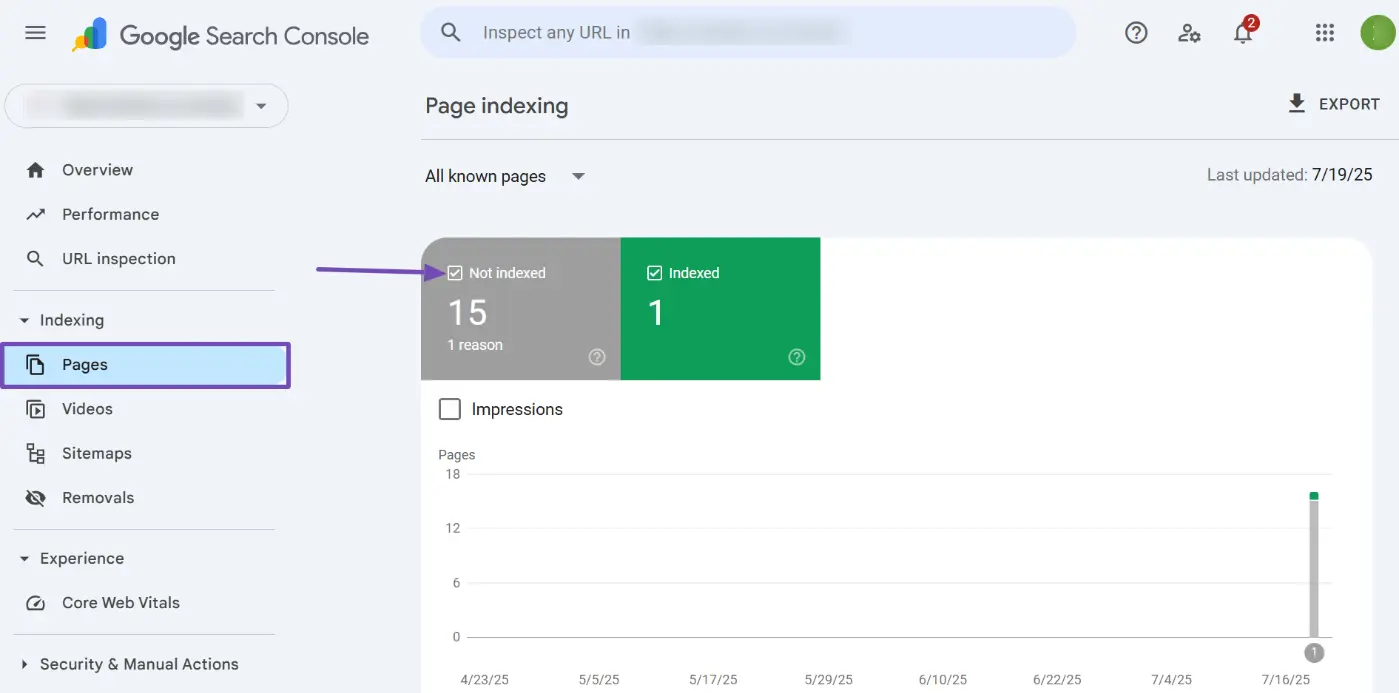
Start by checking whether important pages remain indexed. Google Search Console's indexing reports can help identify excluded URLs. You should also inspect important pages individually.
Check for accidental noindex directives. Review robots.txt rules and canonical tags. Make sure important URLs aren't redirected incorrectly. Check whether deleted pages have appropriate redirects when needed.
Also look for duplicate URLs and unexpected URL variations. Search engines need clear signals about which page should appear in results.
Fix the underlying problem before requesting indexing again. Repeatedly requesting indexing won't solve a technical issue.
Do Core Web Vitals Affect a Ranking Drop?
Core Web Vitals measure important parts of page experience. They focus on loading performance, responsiveness, and visual stability. Poor performance can create a weaker user experience. However, you shouldn't assume every ranking drop comes from Core Web Vitals.
Check your performance data alongside ranking changes. Look for major technical changes that happened before the decline. Review mobile performance as well as desktop performance.
Focus on real performance problems rather than chasing perfect scores. Faster pages can improve usability even when rankings don't immediately change.
What Technical Problems Should You Check First?
Start with issues that can block crawling or indexing. Then review redirects, canonical tags, broken links, and site availability. Check recent website changes as well.
Pay special attention to major updates. These include redesigns, migrations, URL changes, plugin changes, and platform changes. A ranking decline after such an update deserves closer investigation.
Also review your XML sitemap. Make sure it contains the URLs you actually want indexed. Remove outdated or incorrect URLs when necessary.
How Can You Recover Lost Google Rankings?
Recovering lost rankings starts with diagnosis. Don't rewrite every page after seeing a traffic decline. First identify which pages, queries, and sections were affected. Then match each problem with the right fix.
Start with pages that lost significant traffic and compare their previous performance with their current performance. Applying effective SEO practices means thoroughly reviewing search intent, content quality, competitors, and technical signals for these key pages. This structured analysis gives you a clear and actionable recovery plan.
Make one group of changes at a time. Then monitor the results over the following weeks. This makes it easier to understand which changes helped.
Should You Update or Rewrite Old Content?
Update content when the page still serves the right search intent. A full rewrite isn't always necessary. You may only need to improve outdated or weak sections.
Review the introduction, headings, examples, facts, and supporting information. Remove sections that no longer add value. Improve unclear explanations and strengthen important answers.
A rewrite makes more sense when the page has a major intent problem. It can also help when the current structure doesn't serve users well.
Don't change a strong page without evidence. Use your data to guide the decision.
How Can Internal Linking Help Recover Rankings?
Internal links help connect related pages across your website. They can help users find supporting information more easily. They also help search engines understand relationships between pages.
Review pages that lost rankings and their related content. Add relevant internal links where they genuinely help readers. Use descriptive anchor text that clearly explains the linked page.
Don't add dozens of links just for SEO. Each link should make sense in context. Strong internal linking should feel useful rather than forced.
What Should You Avoid After a Google Ranking Drop?
Avoid making many changes at once. Large, untracked changes can make diagnosis difficult. You may fix one issue while creating another. A calm and measured process works better.
Don't immediately delete pages because traffic declined. First understand why they lost visibility. Don't blindly follow every SEO tool recommendation either. Tools can identify possible problems, but context still matters.
You should also avoid keyword stuffing. Adding the same keyword repeatedly won't automatically restore rankings. Focus on useful content, clear intent, and technical health.
Avoid changing URLs without a strong reason. URL changes can create additional ranking and indexing problems. If a URL must change, plan redirects and internal links carefully.
How Long Does It Take to Recover Lost Google Rankings?
There isn't one fixed recovery time for every website. The timeline depends on the cause and the changes made. Technical fixes may show results sooner than larger content improvements. Search systems also need time to recrawl and reassess pages.
Track your progress using consistent data. Compare clicks, impressions, rankings, and indexed pages. Don't judge recovery from one keyword alone.
Look for gradual improvements across related queries. Also watch whether impressions return before clicks increase. These patterns can provide useful clues.
Recovery should be treated as an ongoing SEO process. The goal isn't only to regain old positions. Your pages should become stronger and more useful over time.
How Can You Prevent Another SEO Ranking Drop?
Prevention starts with regular monitoring. Track your important keywords, pages, clicks, and impressions. Review technical issues before they become larger problems. Keep important content accurate and useful.
Set a regular content review schedule. Check pages that generate meaningful organic traffic. Watch for declining impressions before traffic drops become severe.
You should also monitor major website changes. Record redesigns, migrations, URL changes, and content updates. This creates a useful timeline when something changes later.
Keep an eye on competitors too. Search results don't stay the same forever. Strong SEO requires ongoing improvement rather than one-time optimization.
FAQS
What is a Google ranking drop?
A Google ranking drop happens when a webpage loses positions in search results. This can reduce impressions, clicks, and organic traffic. The cause may involve content, technical SEO, search intent, competition, or broader search changes. Before making changes, compare your data and identify when the decline started. This helps you avoid fixing the wrong problem and gives you a clearer recovery strategy.
How do I recover from a Google ranking drop?
Start by identifying which pages and keywords lost visibility. Then check Google Search Console for changes in clicks, impressions, and rankings. Review search intent, content quality, indexing issues, and technical SEO. Compare affected pages with current competitors. Make targeted improvements instead of changing everything at once. Track performance after each major update to understand whether your changes are helping.
Can an algorithm update cause an SEO ranking drop?
Yes, an algorithm update can change search rankings across many websites. However, a ranking decline doesn't automatically mean your website received a penalty. Other pages may have become more relevant for specific searches. Review the timing and scope of your traffic change. Compare affected pages and queries before making major edits. This helps separate broad search changes from problems specific to your website.
How can Google Search Console help find lost rankings?
Google Search Console shows useful performance data for organic search. You can compare clicks, impressions, average position, pages, and queries. This helps identify where your visibility changed. The indexing reports can also reveal pages that aren't indexed as expected. Use these reports together rather than relying on one metric. A clear comparison can help you find patterns behind a Google ranking drop.
Does updating old content improve keyword rankings?
Updating old content can help when the page has become outdated or less useful. Start by checking whether the page still matches the search intent. Then improve weak sections, outdated information, examples, and supporting details. Don't update content only to change its date. The changes should provide real value to readers. Strong updates can make an aging page more relevant and competitive.
Should I worry about Core Web Vitals after rankings drop?
Core Web Vitals are worth checking, but they shouldn't be your first assumption. A ranking drop can have many causes. Review technical SEO, indexing, content, search intent, and competitor changes too. If your site has serious performance problems, fixing them can improve the user experience. Use performance data alongside Search Console and ranking data. This gives you a broader view of what may be happening.


Comments 0
No comments yet. Start the conversation.